
Nov 18, 2026
We’ve launched three updates that make it easier to get your inventory into Crosslist and in front of more buyers.
You can now bring your active listings into Crosslist from all your marketplaces in one go. Crosslist will match the same item across marketplaces using titles and images, and you can review the matches before importing.
More reliable Autodelist. When the same item is linked to all its marketplace listings, Autodelist knows exactly what to remove when it sells. Import from every marketplace you sell on, so nothing is left behind.
One item, connected listings. Matching listings become one Crosslist item, linked to each marketplace.
More complete product information. Missing details are filled in from the matched listings. Each marketplace keeps its own title, description and price.
Less repetitive work. Import from several marketplaces at once instead of one by one.
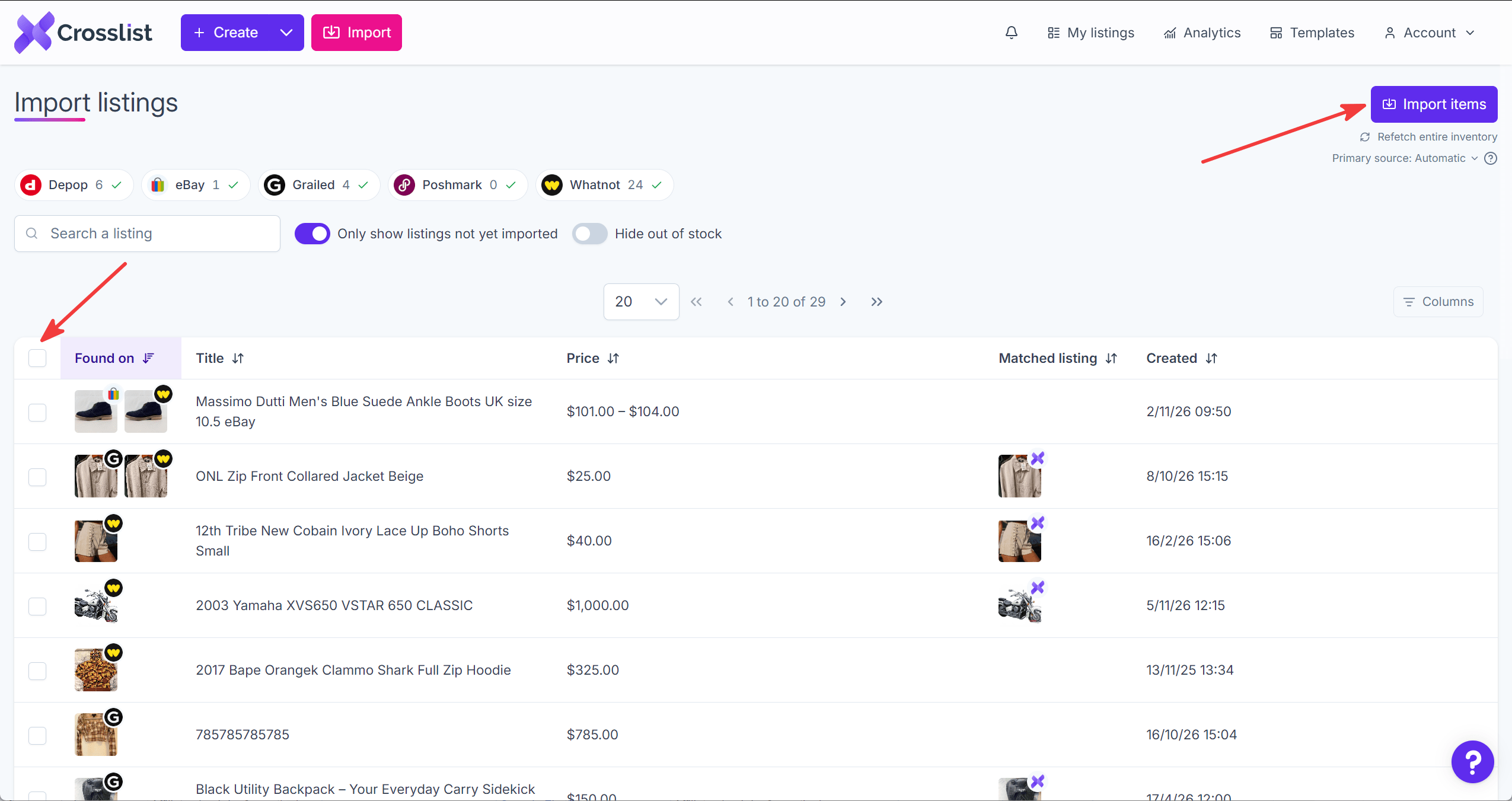
Select every marketplace where you have active listings and import them together. This links listings that aren’t connected in Crosslist yet, so Autodelist can remove them when an item sells.
For items that match your existing Crosslist inventory, the import links the marketplace listings and fills in empty fields, without overwriting existing information.
Matched listings don’t count toward your monthly listing limit. Listings that are already linked stay as they are.
Link existing listings in bulk →
Remember: linking your listings doesn’t turn Autodelist on. Make sure it’s enabled for the marketplaces you want to track.
We're excited to announce our official partnership with Facebook Marketplace, bringing an upgraded API integration to Crosslist that makes selling and managing your inventory easier than ever.
Through this partnership, we're introducing new capabilities to help you reach more buyers, automate your workflows, and manage your sales more efficiently.
Tap into Facebook Marketplace's massive audience. Reach millions of potential buyers through one of the largest online marketplaces, with strong local demand, nationwide reach, and no listing fees.
Expanded shipping options. US sellers can now ship items weighing up to 70 lbs in most categories, opening up more opportunities to sell beyond their local area. Using your own shipping label isn’t supported by Facebook’s API and will be deprecated in the front-end of Marketplace soon.
Cloud-based sales detection via API. Thanks to our new API integration, Crosslist can automatically detect Facebook Marketplace sales even when your computer is turned off, or when you only use Crosslist on your phone.
Automatic delisting across marketplaces. Connect sales detection with Autodelist to automatically remove sold items from your other linked marketplaces, helping prevent double sales.
Note: The new Facebook Marketplace API integration is currently available to US sellers only. UK/CA/AU sellers will continue using our browser extension, which requires their computer to be turned on and the extension to be running for automatic sales detection and delisting.

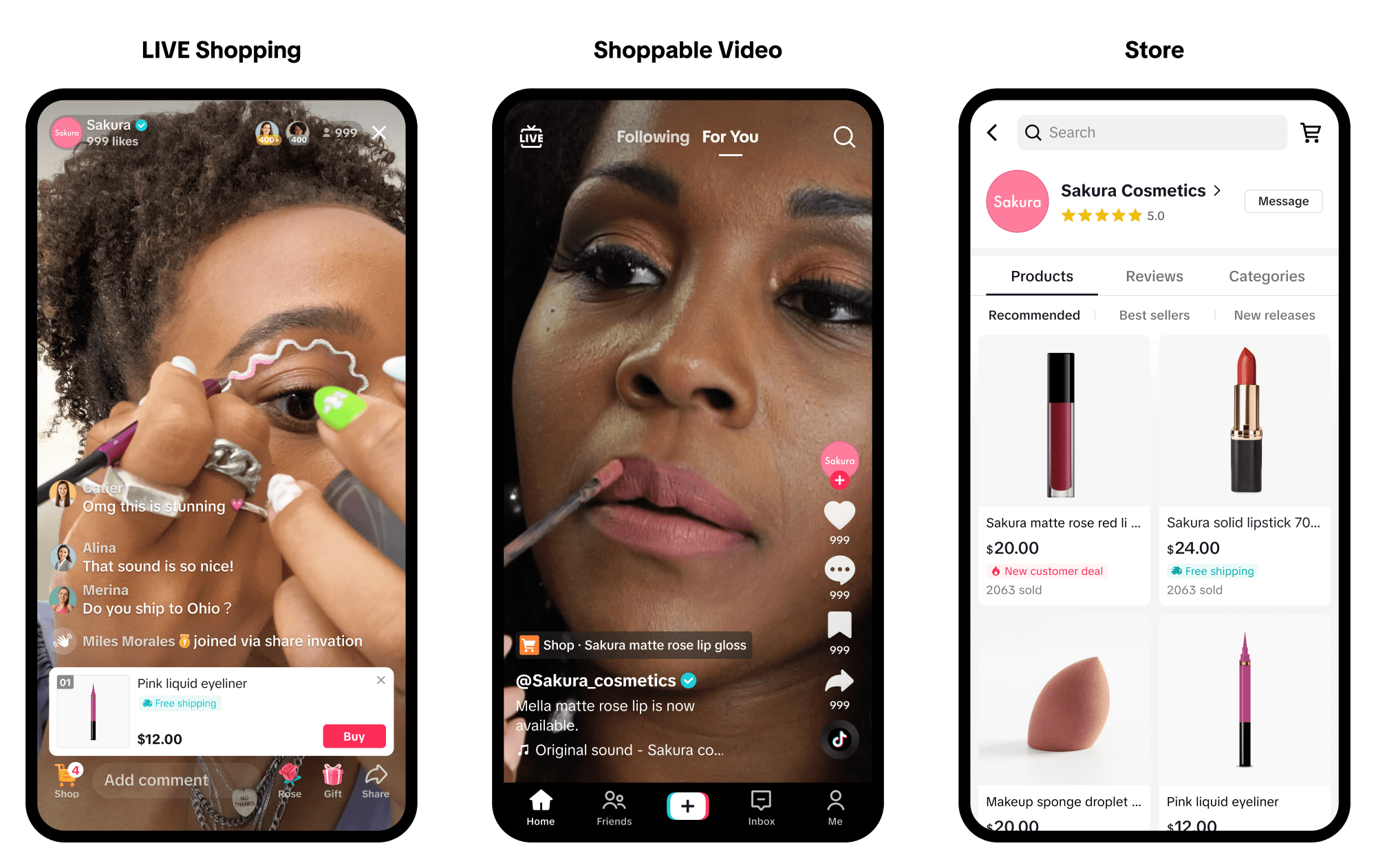
US and UK sellers now have another marketplace to sell on! TikTok Shop is now part of Crosslist's lineup, so you can manage its listings alongside your other marketplaces.
What is TikTok Shop? TikTok Shop is TikTok's built-in shopping platform, allowing buyers to discover and purchase products directly through videos, livestreams, and product listings. It combines social media with e-commerce, helping sellers reach new audiences and turn product discovery into sales.
Here's what you can do with Crosslist:
Reach TikTok's engaged audience. Put your products in front of shoppers who discover new brands and products through TikTok's content-driven shopping experience.
Cross list to TikTok Shop. Use the product information already in Crosslist to get started, then complete any additional fields TikTok Shop requires.
Import existing listings. Already selling on TikTok Shop? Bring those listings into Crosslist. You can import TikTok Shop together with your other marketplaces and review matching items in one go.
Manage listings on computer or mobile. Access the integration from your computer or through the Crosslist mobile app.
Whether you're already selling on TikTok Shop or adding it as another sales channel, you can keep your listings together in Crosslist.
Note before you start: you need an approved TikTok Shop seller account, and the address in your Crosslist user information must match a warehouse address in TikTok Shop.
Connect your TikTok Shop account →

Oct 19, 2026
We just shipped a new marketplace and a big round of AI improvements.
 New marketplace: OfferUp
You can now connect OfferUp to Crosslist and cross list your inventory there alongside your other marketplaces.
OfferUp is a mobile-first marketplace for buying and selling locally, from furniture to electronics and tools.
Built around local pickup, it's perfect for moving items fast without shipping.
 OfferUp is currently available for US users only.
 Better AI listings, less editing
 Upgraded AI models: newer, more capable models now power every listing. Your instructions carry more weight: set your tone, format, or must-have details in your custom instructions once, and the AI sticks to them more closely. It sees every photo: the AI now uses all your listing photos instead of only the first few, so details like tags, measurements, and flaws don’t get missed. More accurate sizes outside the US: the AI now uses your country’s size labels, so you’ll have fewer sizes to fix. More reliable bulk listing: if one item runs into a problem, the rest of your batch still goes through.
 Image generation improvements
Generated images now keep your photo’s aspect ratio, even when you add a reference image Clearer error messages, so you know what went wrong and how to fix it
 New: AI prompting guide
Want even better results from your custom instructions? Our new prompting guide shows you how to write instructions the AI follows well.
Got feedback on these updates? Leave a comment below.

Aug 31, 2026
We built this so you can stop listing items one by one. If you've ever had a pile of product photos waiting to be turned into listings, this one's for you.
AI bulk createUpload a whole batch of photos with AI bulk create and Crosslist groups them into separate listings automatically, based on what it detects in each one. Then you land on a review screen where you can:
Edit titles, and drag or move images between listings
Reorder photos within a listing (the first image becomes the cover)
Add an empty listing if you need one
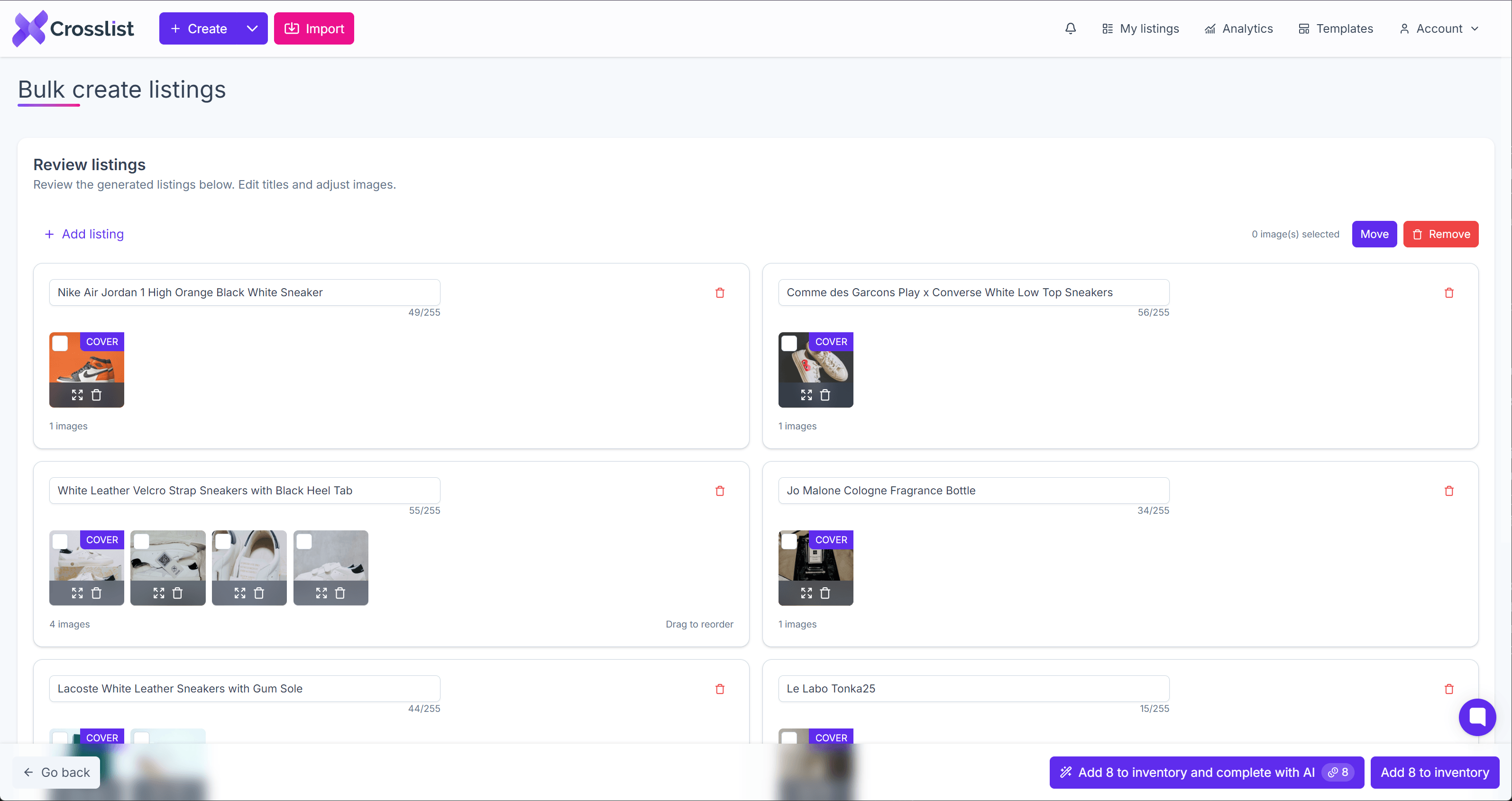
When you're happy, add everything to your inventory as-is, or choose to complete the full listing details with AI in the same step.
 Complete with AI (for existing listings)
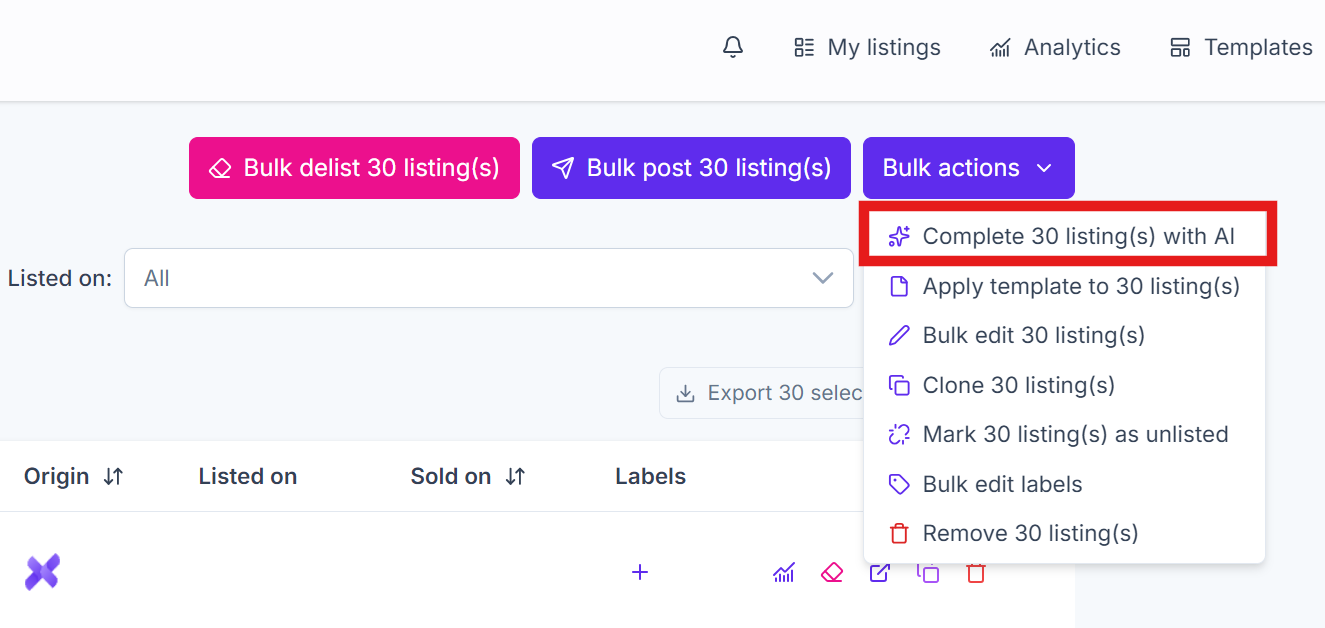
Complete with AI fills in only the missing fields on a listing, great when you've imported from one marketplace and want to post to others that need extra details. You can run it on a single listing or across many at once.
 Powered by AI credits
Both features run on AI credits, included with the AI add-on. Your plan comes with a monthly batch that resets each month, and Crosslist uses those first.
Grouping photos into listings: 1 credit per 10 images
Completing a listing with AI: 1 credit per listing
Run out before your next reset? Buy a credit pack anytime from your subscription settings. 500 for $4.99 or 1,000 for $8.99. Packs last 90 days.

Jul 6, 2026
The wait is over! 
Two of our most requested features are now available in Crosslist: Autodelist and Sales Analytics!
 Autodelist
When an item sells, Crosslist can automatically update your inventory across marketplaces.
That means:
No more double selling
No manual delisting
Inventory stays in sync automatically
Automatically update or remove listings from your other marketplaces
Note: Autodelist and Sales Analytics are available on Gold and Diamond plans.
Activation required (important)Autodelist is off by default. To enable it, you’ll need to:
→ Go to the Autodelist settings page
→ Toggle it on per marketplace
This gives you full control over where it runs.
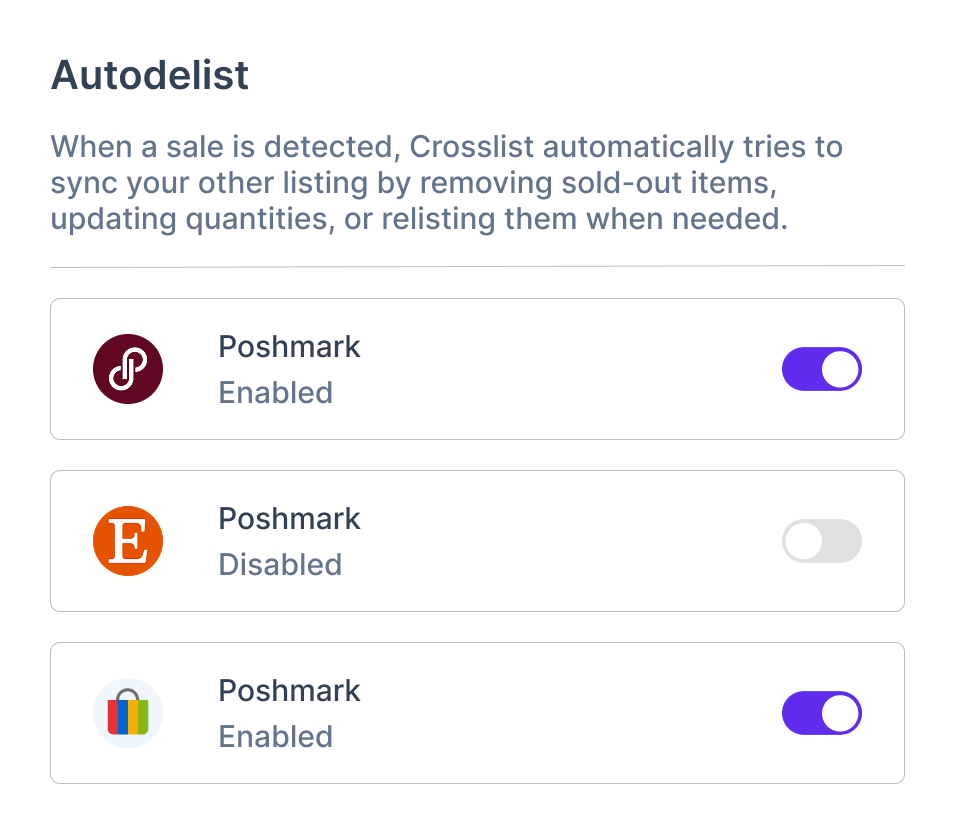
 How sales detection works
eBay, Etsy, Shopify, WooCommerce → automatic
Poshmark & other marketplaces → this requires your desktop/browser to be running
If your computer is off, autodelisting won’t happen immediately, it will sync once you're back online.
 Quantity handling (important)
Autodelist doesn’t always mean a listing is fully removed.
If an item sells on one marketplace and if you have multiple quantities of the same item in Crosslist, we’ll decrease the quantity within Crosslist. On the other marketplaces that have this item, we’ll:
Decrease the quantity if that marketplace supports quantity
Do nothing if the marketplace does not support quantity (the listing simply stays online)
On the marketplace that the item originally sold on, we’ll:
Do nothing if that marketplace supports quantity
Relist the item if that marketplace does not support quantity and you still have more than 1 in Crosslist EXCEPT for Vinted where relisting sold items is not allowed
 Sales analytics
You’ll also see a new Sales overview and analytics page in your dashboard so you can track your sales, profit, and marketplace performance in one place.
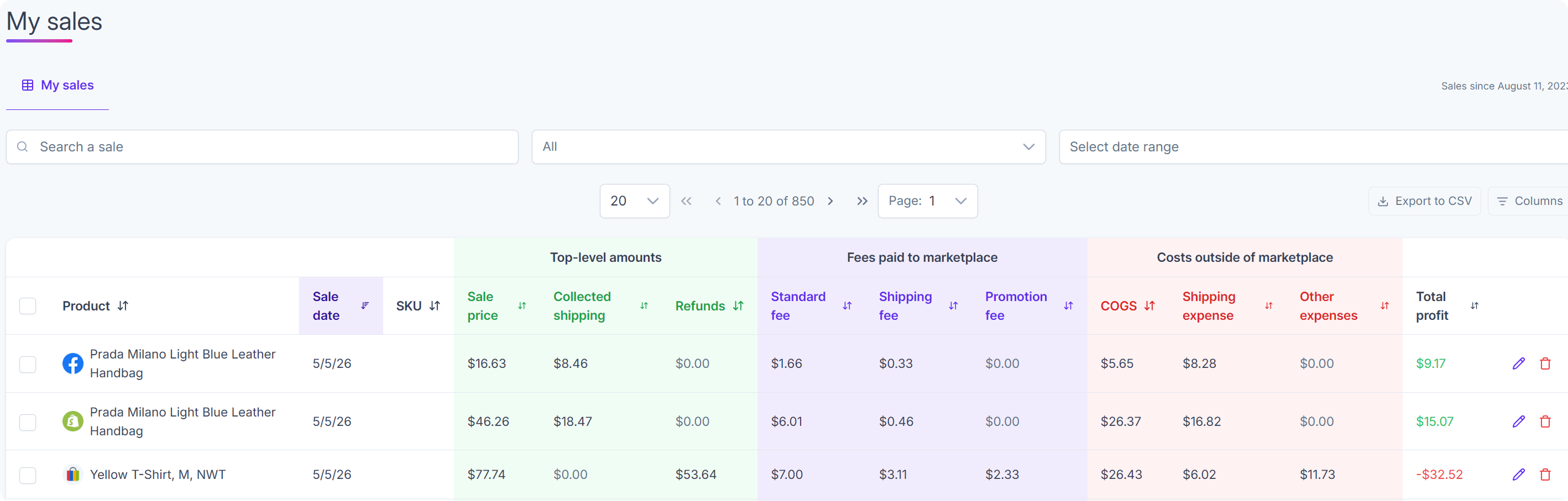
Track:
Detected sales
Your sales activity across marketplaces
Sales insights
Profit and loss
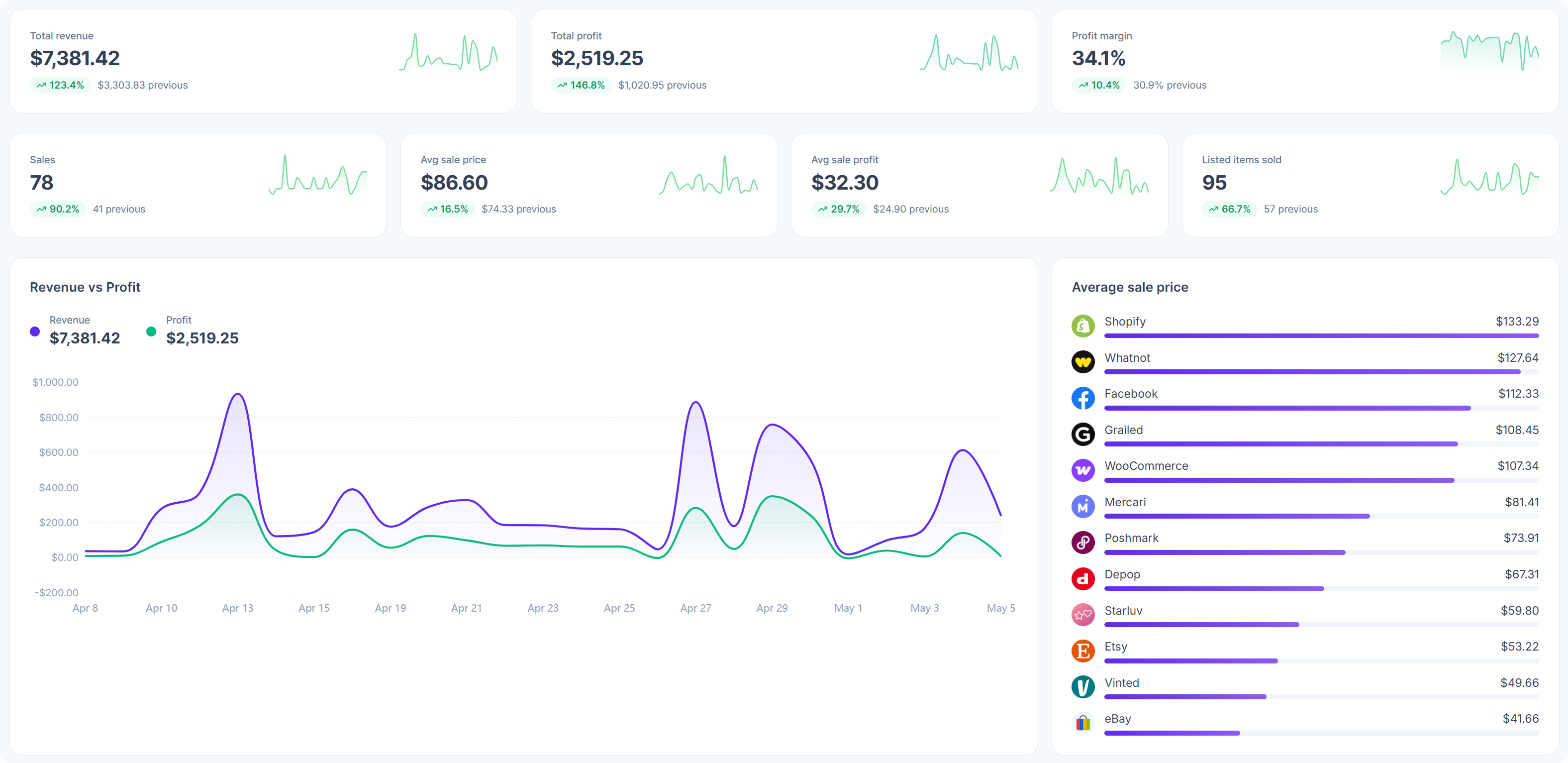
Available on Gold and Diamond plans.
To access Autodelist and Sales Analytics, you’ll need to install the latest version of the Crosslist extension:
Ready to get started? Enable Autodelist in your settings and check out your new Sales Analytics dashboard.
Thank you for all the feedback from our beta testers that helped shape the final product!

May 19, 2026
Hi all,
One of our most requested features is finally here.
The Crosslist Mobile App has launched 
You can now manage your reselling business directly from your phone with the same powerful tools you use on desktop.
Import listings Create new listings Crosslist to multiple marketplaces Relist inventory Delist sold items Manage inventory anywhere
List while sourcing.
Cross list while traveling.
Manage inventory between tasks.
Grow your business without being tied to your desk.
 Download the Crosslist Mobile App and start listing on the go.
Thank you for all the feedback from our beta testers that helped shape the final product!

Jan 14, 2026
Hi all,
Happy New Year!
New year, clean dashboard, smarter listings. Our devs didn’t rest during the holidays (okay… maybe just a little  ), and we’re excited to kick off 2026 with new features that make managing and updating your listings faster and stress-free.
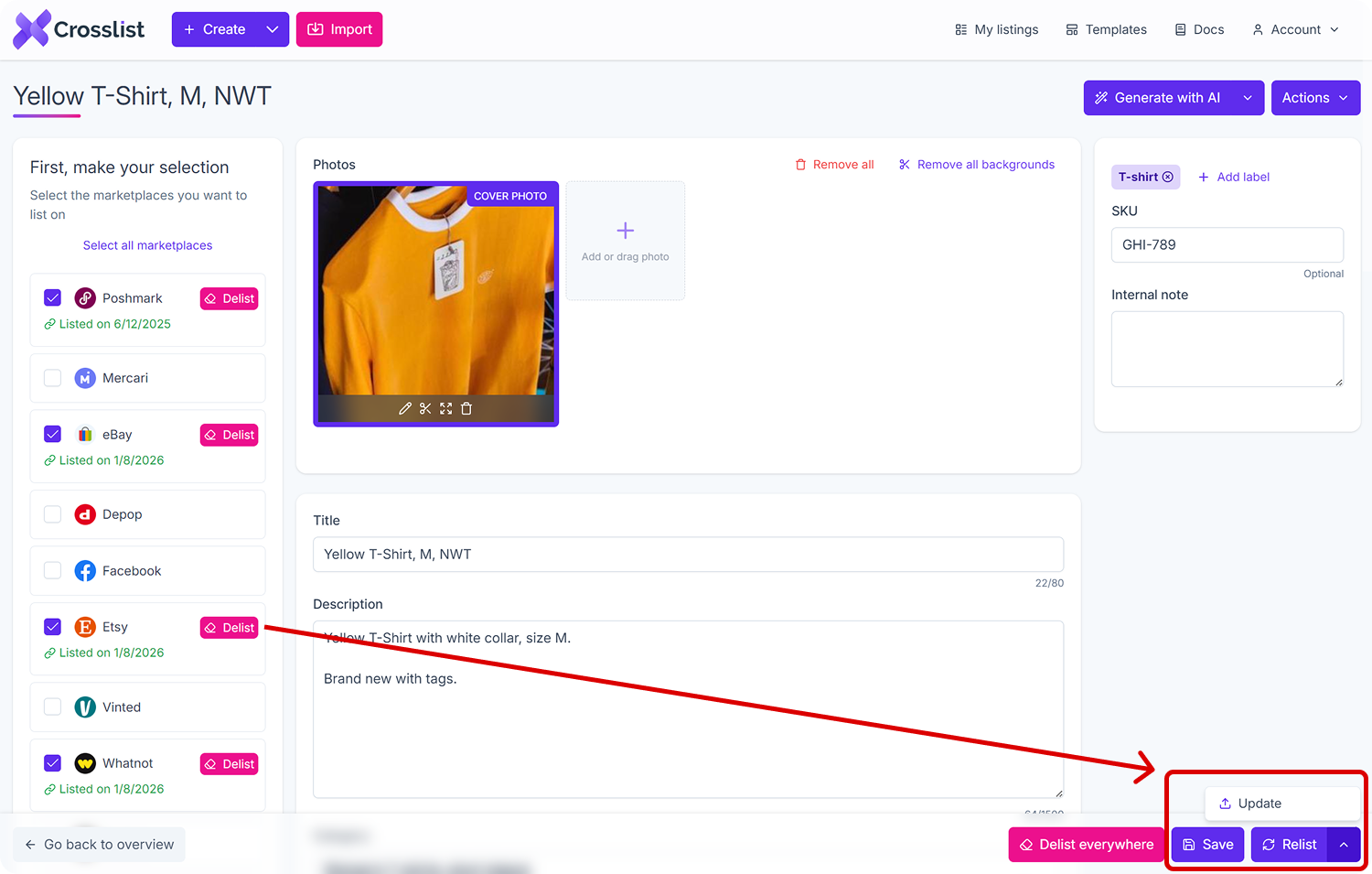
Update listingsDon’t want to trigger the relisting warning? You can now update your existing listings directly — without triggering the marketplace.
Simply make your edits, select the marketplaces you want to update, and click Update.
Updating listings is especially useful if you want to keep your existing shares and visibility on Poshmark, no need to relist just because you’ve adjusted a price, which can reset your listing age or trigger their 60-day relisting policy.
And on Etsy, you can save on listing fees by updating existing listings instead of creating new ones or relisting.
It’s faster, safer, and more efficient while keeping your listings up to date.
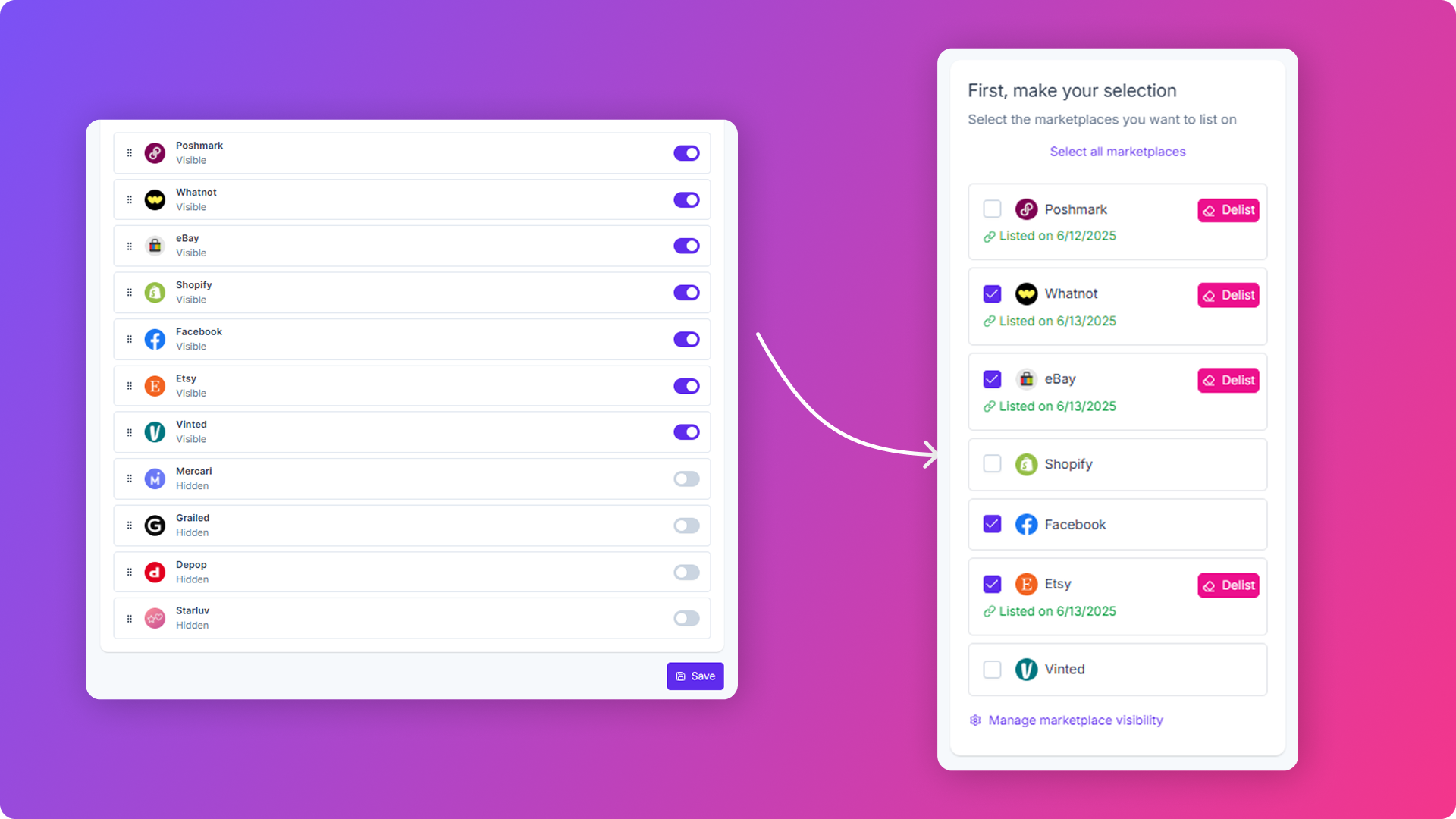
 Marketplace visibility
Keep your dashboard clean and organized.
Hide marketplaces you don’t use and reorder your favourites to the top for a cleaner, more focused workspace.
 Improved shipping options
We’ve improved how shipping works across marketplaces!
You can now choose your preferred shipping policies on eBay and Etsy, no more automatic defaults.
Create multiple shipping profiles per marketplace (for example, one for prepaid and one for self-shipping) and pick them per item.
For UK users, we’ve added better support for metric weight units (KG).
Want to see certain features developed faster? Cast your vote on our roadmap to help prioritize them!
Your feedback helps shape every update, so keep it coming!
Happy listing!

Oct 24, 2025
Hi all,
We’re excited to announce several major upgrades to Crosslist that make managing your listings faster, smarter, and more efficient than ever.
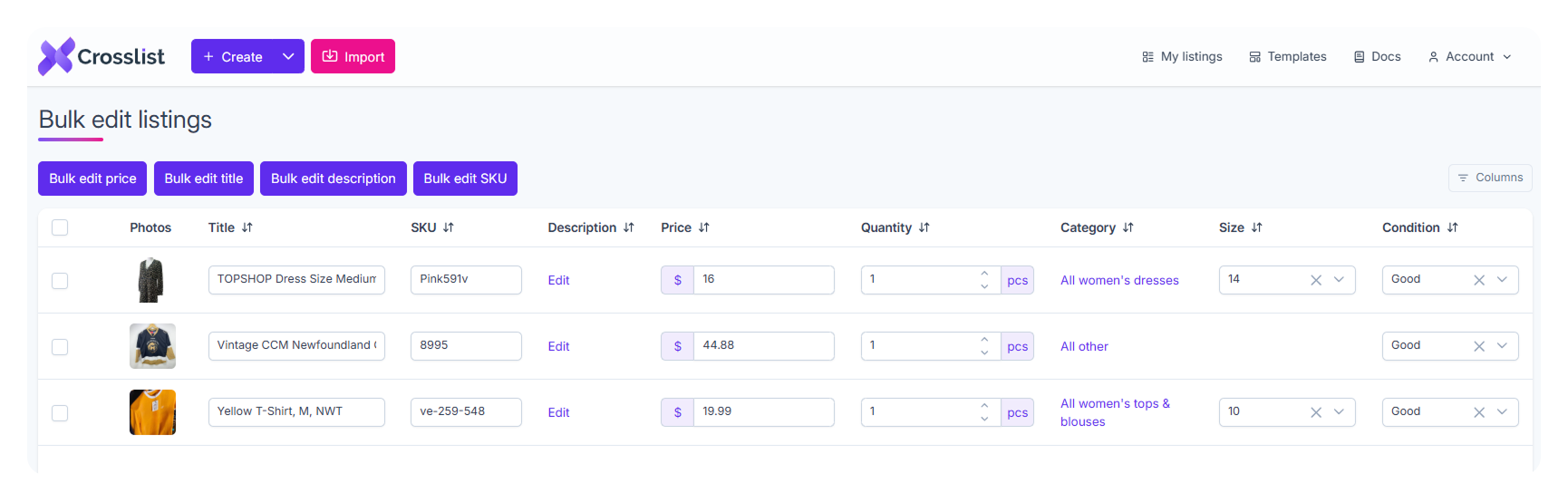
 Bulk editor: edit everything, at once.
Our new bulk editor lets you manage multiple listings in a single, powerful view.
You can now:
Edit multiple listings in a clean table view Adjust titles, prices, and descriptions at once Apply discounts or price changes in bulk (perfect for sales!) Edit descriptions lightning-fast without going back and forth
Perfect for quick promotions, seasonal pricing, or tidying up your inventory in seconds.
 Smart categories: perfect mapping
We’ve updated our category structure to make sure your listings match perfectly between Crosslist and your marketplaces.
Categories like collectibles, craft supplies and sports & outdoors are now more detailed, so your items transfer more smoothly and accurately across platforms.
 Duplicate listing detection
Crosslist now recognizes if a listing already exists in your inventory when importing.
Matching titles are automatically linked to the existing listing
Helps keep your inventory clean and organized, preventing duplicates
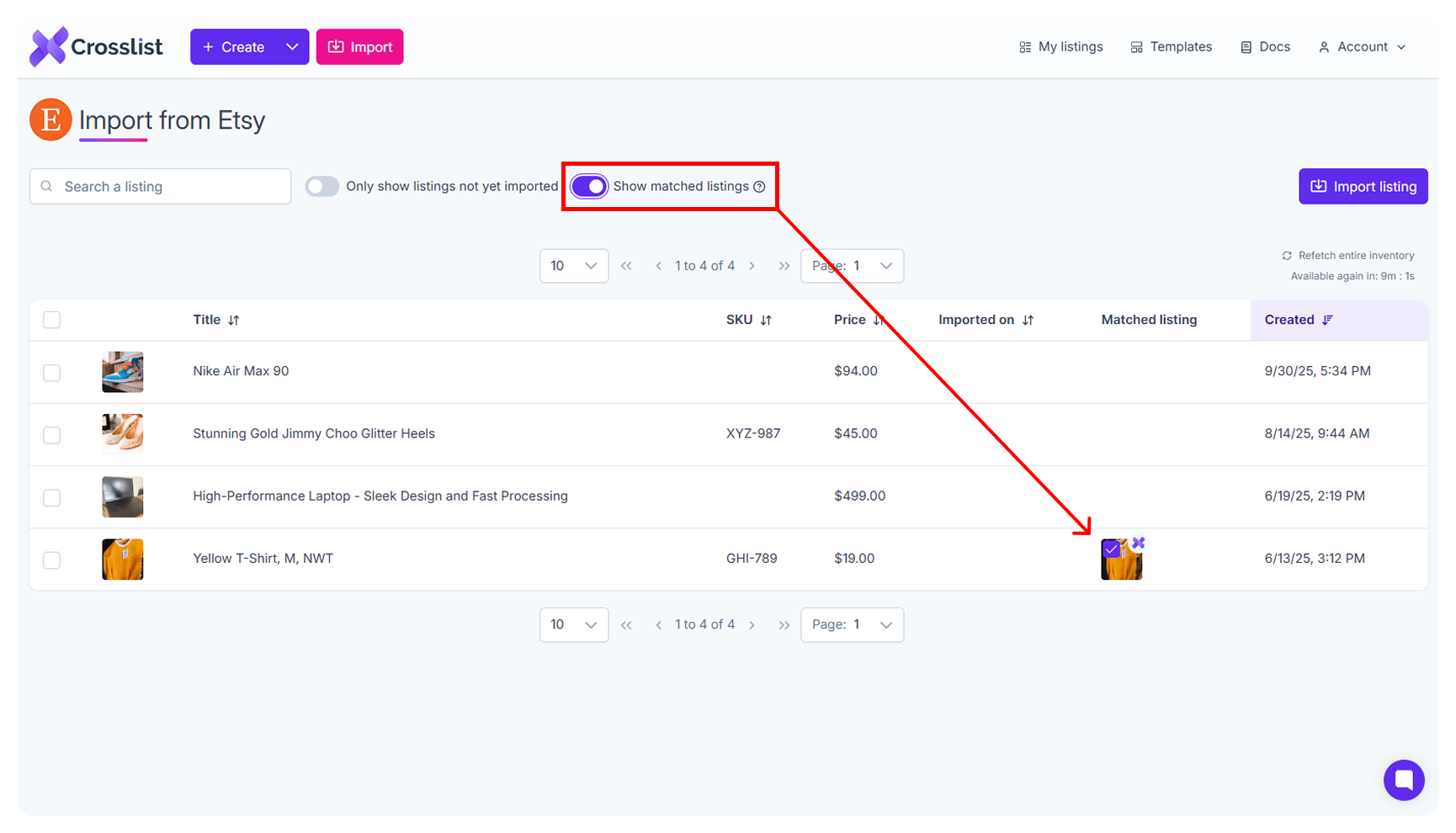
Important: this feature must be toggled on manually when importing!
(Note: Detection currently works on exact title matches, improvements coming soon!)
We’re already working on other advanced features:
Edit listings without relisting
More advanced shipping options
And more!
Want to see certain features developed faster? Cast your vote on our roadmap to help prioritize them!
You can start using all new features immediately from your Crosslist dashboard.
Open Crosslist and test the new features!
Thanks for your continued feedback and support, every update we build is shaped by your input.
Happy listing!

Jun 10, 2025
Hi all,
We’re pleased to let you know that we completed a full redesign of the Crosslist app — not to just make it look better, but to make the app faster, more stable, and ready for the features we’re building next.
We’ve rebuilt the app’s foundation to make it faster, more stable, and future-proof for the features we’re working on behind the scenes. This update also brings a cleaner, more modern interface across both desktop and mobile.
New color scheme – A fresh, cleaner design that makes everything easier on the eyes.
Improved listing form – Less scrolling, quicker edits, and a smoother experience overall.
Full-width listing table – More space to work, especially on desktop.
A better mobile experience – You can still only create and prepare listings on mobile for now, but everything is more stable and easier to use. Posting and importing will come in a future update.
Redesigned settings menu – Easier to navigate and better organized.
In the short term, we’re starting with power features that have been requested by our most active users, including:
Improved AI — more fields, more customization (tone, custom prompts, etc.)
More advanced bulk editing features — e.g., only modify certain fields, append/prepend text to description
Custom pricing per marketplace.
More advanced shipping options for eBay and Etsy.
Other productivity improvements: several roadmap features are in review and will be moved to the Planned stage soon.
After that, we’ll move into bigger updates:
Automatic delisting when items sell.
Full mobile support, including posting and importing listings.
New marketplaces — vote on the ones you want to see in our roadmap!
Want to see certain features developed faster? Cast your vote on our roadmap to help prioritize them!
Since this is a big update, there might be a few rough edges. If you run into anything weird, just mention the word bug to Crossly (our AI-assistant) and then click Report an issue. We’ll take it from there.
Thanks for being with us — this is just the beginning.

Apr 28, 2025
On Friday, we hinted that something rhyming with "top spot" was coming in hot ( ) — and now it’s official!
Crosslist now supports Whatnot, making it even easier to expand your reach across marketplaces.
How to get started?
No extra setup needed. Simply update your Crosslist extension if that hasn’t been done automatically, and you’ll be able to:
Import your Whatnot listings into Crosslist Autopost products from Crosslist and other marketplaces to Whatnot Manage your multi-platform inventory more efficiently
Note: Posting to Whatnot may take a bit longer than posting to other marketplaces — nothing to worry about, everything is working as it should!
Happy cross listing!

Mar 5, 2025
Great news! We’re excited to let you know that Crosslist now integrates with Shopify, making it easier than ever to import and autopost your listings between Shopify and other marketplaces!
To access Shopify support, simply reinstall the Crosslist extension and accept the new permissions - no extra setup required. Once updated, you'll be able to:
Import your Shopify listings into Crosslist Autopost products from Crosslist to Shopify Manage your multi-platform inventory more efficiently
Make sure to accept the new permissions that our extension requires. Normally, you’ll be prompted a pop-up to accept these new permissions.
Didn’t get the pop-up or mistakenly refused the new permissions? Then follow the steps below:
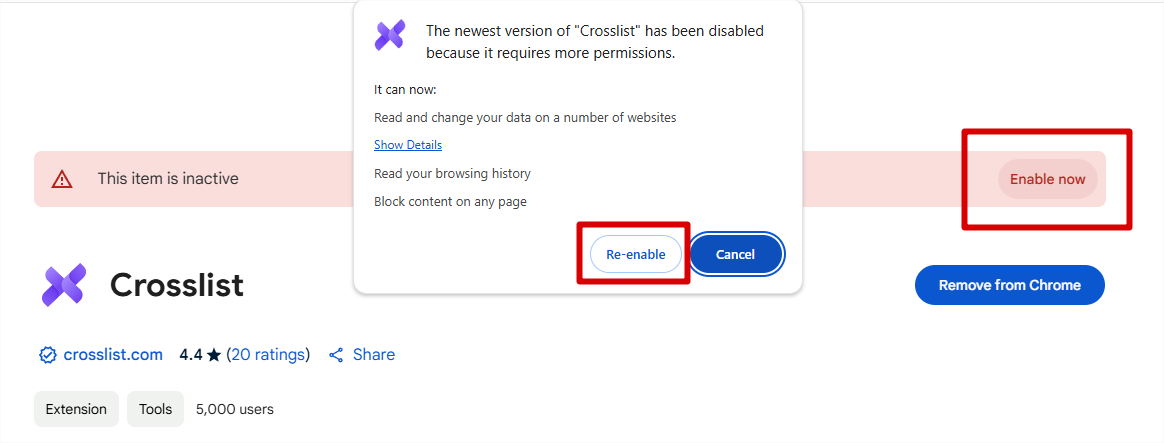
1) To manually accept the new permissions, navigate to this page, then click the Enable now button in the red banner.
2) In the pop-up, click the Re-enable button. The new permissions are necessary to make Crosslist work for Shopify.